dumbbellplot

dumbbellplot creates a dumbbell chart comparing two sets of values

Syntax

Description

A dumbbell plot is a data visualization used to compare two values per category. Each category is represented by two points connected by a line, resembling a dumbbell. The two points usually indicate before–after, A vs B, or two time periods. The distance between the points highlights the magnitude of change or difference. Colors or shapes can distinguish the two values clearly. It is especially effective when comparing many categories without clutter. Dumbbell plots emphasize direction of change better than bar charts. They work well with ordered categories to show trends. They require a common numeric scale for meaningful comparison.

Overall, dumbbell plots provide a clean and intuitive comparison tool.

example

ax =dumbbellplot(X) Example data for a 10-row dumbbell chart.

example

ax =dumbbellplot(X, Name, Value) Example double vertical plot.

Examples

expand all

  • Example data for a 10-row dumbbell chart.
  • categories = "Item " + (1:10)';                 
    beforeVals  = [52; 47; 63; 58; 44; 71; 39; 66; 55; 49];
    afterVals   = [61; 50; 68; 62; 48; 78; 45; 70; 60; 54]; 
    T = table(beforeVals, afterVals, ...
    'VariableNames', {'Before','After'},'RowNames',categories);
    dumbbellplot(T);
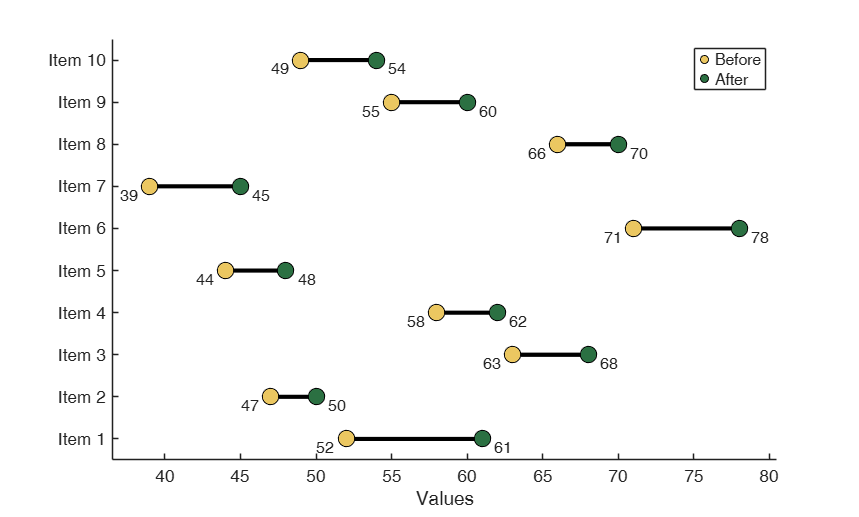
    Click here for the graphical output of this example (link to Ro.S.A. website).

  • Example double vertical plot.
  • Patient health metrics: systolic BP comparison across two time periods

    patients = {'Patient A', 'Patient B', 'Patient C', 'Patient D'};
    % Period 1: January measurements
    jan_morning = [120, 135, 128, 142];
    jan_evening = [128, 145, 135, 150];
    % Period 2: June measurements (after lifestyle changes)
    jun_morning = [115, 125, 120, 135];
    jun_evening = [122, 132, 128, 142];
    figure;
    dumbbellplot(jan_morning, jan_evening, jun_morning, jun_evening, ...
    'plotType', 'double','orientation', 'vertical','labelX1', 'Morning', ...
    'labelX2', 'Evening','Title', {'January BP', 'June BP'},'YLabels', patients);
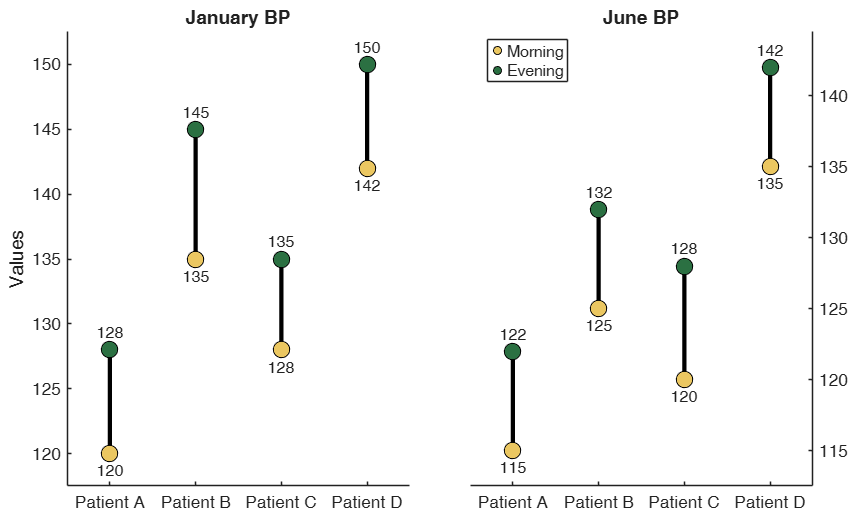
    Click here for the graphical output of this example (link to Ro.S.A. website).

    Related Examples

    expand all

  • Example of MarkerSize being used to show weights.
  • products = {'Product A', 'Product B', 'Product C', 'Product D', 'Product E'};
    before_campaign = [65, 45, 78, 52, 88];
    after_campaign = [82, 68, 95, 71, 92];
    % Marker sizes based on revenue importance (arbitrary weights)
    importance = [300, 200, 150, 90, 450];
    figure;
    dumbbellplot(before_campaign, after_campaign, ...
    'MarkerSize', importance, ...           
    'labelX1', 'Pre-Campaign', ...
    'labelX2', 'Post-Campaign', ...
    'Title', 'Marketing Campaign Impact (marker size = revenue weight)', ...
    'YLabels', products);
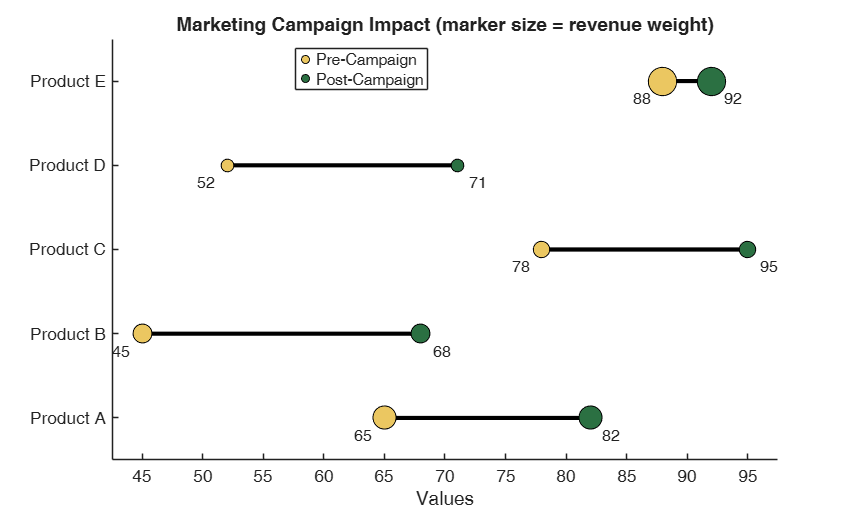
    Click here for the graphical output of this example (link to Ro.S.A. website)

  • Example of plot with background bands and text inside the dots.
  • X1 = [45, 62, 38, 71, 55, 48];
    X2 = [58, 55, 75, 84, 68, 52];
    categories = {'Sales', 'Marketing', 'IT', 'HR', 'Finance', 'Operations'};
    figure;
    dumbbellplot(X1,X2, "YLabels", categories, "Title", "Horizontal Plot with background bands", ...
    "TextInside", true, "labelX1","Q1", "labelX2", "Q2", "Background", "bands");
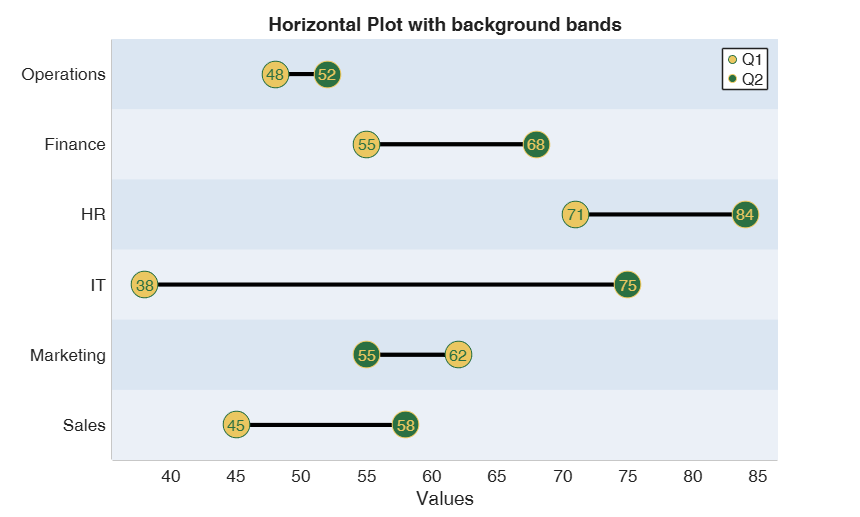
    Click here for the graphical output of this example (link to Ro.S.A. website)

    Input Arguments

    expand all

    X — Input data. Vector or table with one or more columns.

    Data matrix containing n observations

    Data Types: 2D array or table

    Name-Value Pair Arguments

    Specify optional comma-separated pairs of Name,Value arguments. Name is the argument name and Value is the corresponding value. Name must appear inside single quotes (' '). You can specify several name and value pair arguments in any order as Name1,Value1,...,NameN,ValueN.

    Example: 'AxesFontSize', 15 , 'Background', 'bands' , 'Color', [0.88, 0.30, 0.30; 0.20, 0.42, 0.85] , 'ColorDist', 'directional' , 'labelX1','mylabelBefore' , 'labelX2','mylabelAfter' , 'LineWidth', 2.5 , 'MarkerSize', 200 , 'Orientation','vertical' , 'plotType', 'double' , 'TextInside', true , 'TextSize', 14 , 'Title', '2025 products revenue' , 'YLabels', ["Product A", "Product B", "Product C"]

    AxesFontSize —Font size of axis labels and ticks.numeric scalar.

    Controls the font size of the axis labels.

    Example: 'AxesFontSize', 15

    Data Types: double

    Background —Style of background of the plot.string | char.

    Controls whether alternating background bands are displayed behind the plot. Admissible values: 'none' (default), 'bands'

    Example: 'Background', 'bands'

    Data Types: string | char

    Color —Color of the dots.string | char | 2x3 numeric array.

    Specifies the colors for the two sets of dots. Can be either a built-in palette ('default', 'colorblind', 'ruby_jade','cherry_sky', 'red_blue') or a 2x3 array of RGP triplets where each row defines the color of a set of dots.

    Example: 'Color', [0.88, 0.30, 0.30; 0.20, 0.42, 0.85]

    Data Types: string | char | array of 2 valid MATLAB colours

    ColorDist —Color mapping based on difference between points.string | char.

    Controls whether and how the connecting lines are colored based on the difference between the two values.

    Admissible values are:'false' (default) 'directional','magnitude','robust'

    Example: 'ColorDist', 'directional'

    Data Types: string | char

    labelX1 —Custom legend label for the first set of data.char | string.

    The Default label is "X1" if X1 is numeric vector or the corresponding table name if X1 is a table.

    Example: 'labelX1','mylabelBefore'

    Data Types: char or string

    labelX2 —Custom legend label for the second set of data.char | string.

    The Default label is "X2" if X2 is numeric vector or the corresponding table name if X2 is a table.

    Example: 'labelX2','mylabelAfter'

    Data Types: char or string

    LineWidth —Width of the bars of the plot.numeric scalar.

    Controls the thickness of the lines (bars) connecting each pair of dots in the dumbbell plot.

    Example: 'LineWidth', 2.5

    Data Types: Double

    MarkerSize —Size of the dots.numeric scalar | vector.

    If scalar, all markers use the same size. If vector, it must have the same length as the number of data pairs (rows), and each pair of dots will use the corresponding size value.

    Example: 'MarkerSize', 200

    Data Types: numeric scalar or vector

    orientation —orientation of the plot.string | char.

    Admissible values are 'horizontal' (default) or 'vertical'

    Example: 'Orientation','vertical'

    Data Types: string or char

    plotType —Type of plot layout.char | String.

    Determines whether to create a single plot or a side by side plot. Admissible values are 'single' (default) or 'double'

    Example: 'plotType', 'double'

    Data Types: char or string

    TextInside —Position of data value labels.logical scalar.

    When true, numeric labels are displayed inside the marker dots.

    if false, labels are positioned outside the markers.

    Example: 'TextInside', true

    Data Types: logical

    TextSize —Font size of data value labels.numeric scalar.

    Controls the font size of the numeric labels displayed near or inside the dots.

    Example: 'TextSize', 14

    Data Types: double

    Title —plot title(s).string | char | cell array.

    Title(s) for the chart(s). The number of input titles, must be equal to the number of plots that are created. Default value for double plots is ['Year 1' 'Year 2']

    Example: 'Title', '2025 products revenue'

    Data Types: string or char or cell array

    YLabels —Custom tick labels.string | char | cell array.

    Custom labels for each category (row) in the plot. Must have the same length as the number of rows. If not provided, default names will be used ('Row 1', 'Row 2',...)

    Example: 'YLabels', ["Product A", "Product B", "Product C"]

    Data Types: string | char | cell array

    Output Arguments

    expand all

    ax —handles to the charts. Graphic handle or Vector of graphic handles

    If the plot is single, a single ax handle is return; else, ax is a vector containing the graphics handles for all the plots

    References

    Cleveland, W. S. (1984). Graphical Methods for Data Presentation, "The American Statistician", Vol. 38, pp. 270–280

    See Also

    This page has been automatically generated by our routine publishFS