CorAnaplot

CorAnaplot draws customized Correspondence Analysis (CA) graphs

Syntax

Description

example

CorAnaplot(out) CorAnaplot with all the default options.

example

CorAnaplot(out, Name, Value) CorAnaplot with personalized symbols.

Examples

expand all

  • CorAnaplot with all the default options.
  • Prepare the data.

    N=[51	64	32	29	17	59	66	70;
    53	90	78	75	22	115	117	86;
    71	111	50	40	11	79	88	177;
    1	7	5	5	4	9	8	5;
    7	11	4	3	2	2	17	18;
    7	13	12	11	11	18	19	17;
    21	37	14	26	9	14	34	61;
    12	35	19	6	7	21	30	28;
    10	7	7	3	1	8	12	8;
    4	7	7	6	2	7	6	13;
    8	22	7	10	5	10	27	17;
    25	45	38	38	13	48	59	52;
    18	27	20	19	9	13	29	53;
    35	61	29	14	12	30	63	58;
    2	4	3	1	4	nan  nan	nan	  ;
    2	8	2	5	2	nan  nan	nan;
    1	5	4	6	3	nan  nan	nan;
    3	3	1	3	4	nan  nan	nan];
    % rowslab = cell containing row labels
    rowslab={'money','future','unemployment','circumstances',...
    'hard','economic','egoism','employment','finances',...
    'war','housing','fear','health','work','comfort','disagreement',...
    'world','to_live'};
    % colslab = cell containing column labels
    colslab={'unqualified','cep','bepc','high_school_diploma','university',...
    'thirty','fifty','more_fifty'};
    if verLessThan('matlab','8.2.0')==0
    tableN=array2table(N,'VariableNames',colslab,'RowNames',rowslab);
    % Extract just active rows
    Nactive=tableN(1:14,1:5);
    Nsupr=tableN(15:18,1:5);
    Nsupc=tableN(1:14,6:8);
    Sup=struct;
    Sup.r=Nsupr;
    Sup.c=Nsupc;
    % Compute Correspondence analysis
    else
    Nactive=N(1:14,1:5);
    Lr=rowslab(1:14);
    Lc=colslab(1:5);
    Sup=struct;
    Sup.r=N(15:end,1:5);
    Sup.Lr=rowslab(15:end);
    Sup.c=N(1:14,6:8);
    Sup.Lc=colslab(6:8);
    end
    % Compute correspondence analysis
    out=CorAna(Nactive,'Sup',Sup,'plots',0,'dispresults',false);
    % Show the correspondence analysis plot.
    % Rows and columns are shown in principal coordinates
    CorAnaplot(out)
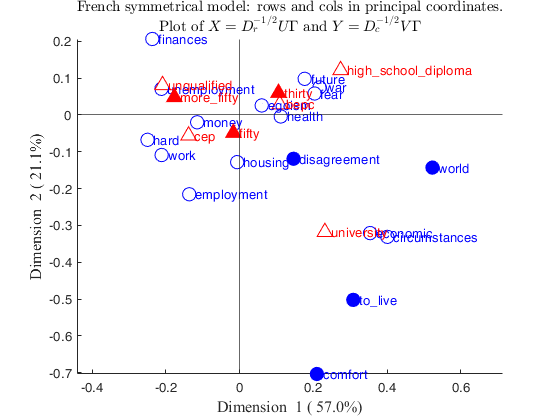
    Click here for the graphical output of this example (link to Ro.S.A. website).

  • CorAnaplot with personalized symbols.
  • close all
    % Prepare the data.
    N=[51	64	32	29	17	59	66	70;
    53	90	78	75	22	115	117	86;
    71	111	50	40	11	79	88	177;
    1	7	5	5	4	9	8	5;
    7	11	4	3	2	2	17	18;
    7	13	12	11	11	18	19	17;
    21	37	14	26	9	14	34	61;
    12	35	19	6	7	21	30	28;
    10	7	7	3	1	8	12	8;
    4	7	7	6	2	7	6	13;
    8	22	7	10	5	10	27	17;
    25	45	38	38	13	48	59	52;
    18	27	20	19	9	13	29	53;
    35	61	29	14	12	30	63	58;
    2	4	3	1	4	nan  nan	nan	  ;
    2	8	2	5	2	nan  nan	nan;
    1	5	4	6	3	nan  nan	nan;
    3	3	1	3	4	nan  nan	nan];
    % rowslab = cell containing row labels
    rowslab={'money','future','unemployment','circumstances',...
    'hard','economic','egoism','employment','finances',...
    'war','housing','fear','health','work','comfort','disagreement',...
    'world','to_live'};
    % colslab = cell containing column labels
    colslab={'unqualified','cep','bepc','high_school_diploma','university',...
    'thirty','fifty','more_fifty'};
    if verLessThan('matlab','8.2.0')==0
    tableN=array2table(N,'VariableNames',colslab,'RowNames',rowslab);
    % Extract just active rows
    Nactive=tableN(1:14,1:5);
    Nsupr=tableN(15:18,1:5);
    Nsupc=tableN(1:14,6:8);
    Sup=struct;
    Sup.r=Nsupr;
    Sup.c=Nsupc;
    % Compute Correspondence analysis
    else
    Nactive=N(1:14,1:5);
    Lr=rowslab(1:14);
    Lc=colslab(1:5);
    Sup=struct;
    Sup.r=N(15:end,1:5);
    Sup.Lr=rowslab(15:end);
    Sup.c=N(1:14,6:8);
    Sup.Lc=colslab(6:8);
    end
    % Six-pointed star (hesagram) for supplementary rows
    SymbolRows='h';
    % Five-pointed star (pentagram) for supplementary rows
    SymbolRowsSup='p';
    % Color for active rows
    ColorRows='b';
    % Color for supplementary rows (dark blue)
    ColorRowsSup=[6 13 123]/255;
    % Blue fill color for active rows
    MarkerFaceColorRows='b';
    % Right-pointing triangle for active columns
    Symbolcols='^';
    % Six-pointed star (hexagram) for supplementary columns
    SymbolcolsSup='h';
    % Color for active columns
    ColorCols='r';
    % Red fill color for active rows
    MarkerFaceColorCols='r';
    % Color for supplementary columns (dark red)
    ColorColsSup=[128 0 0]/255;
    plots=struct;
    plots.SymbolRows=SymbolRows;
    plots.SymbolRowsSup=SymbolRowsSup;
    plots.ColorRows=ColorRows;
    plots.ColorRowsSup=ColorRowsSup;
    plots.MarkerFaceColorRows=MarkerFaceColorRows;
    plots.SymbolCols=Symbolcols;
    plots.SymbolColsSup=SymbolcolsSup;
    plots.ColorCols=ColorCols;
    plots.ColorColsSup=ColorColsSup;
    plots.MarkerFaceColorCols=MarkerFaceColorCols;
    % change the sign of the second dimension
    changedimsign=[false true];
    out=CorAna(Nactive,'Sup',Sup,'plots',0,'dispresults',false);
    CorAnaplot(out,'plots',plots,'changedimsign',changedimsign)
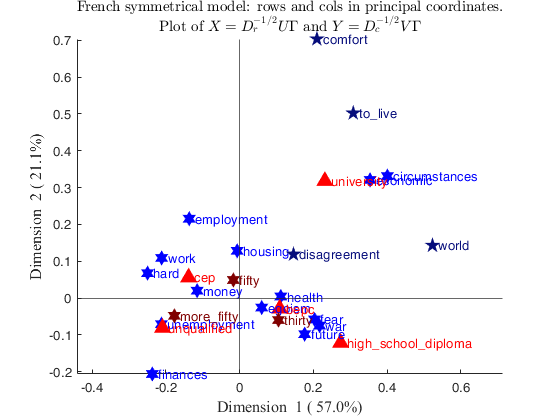
    Click here for the graphical output of this example (link to Ro.S.A. website).

    Related Examples

    expand all

  • CorAnaplot with personalized displacement.
  • close all
    % Prepare the data.
    N=[51	64	32	29	17	59	66	70;
    53	90	78	75	22	115	117	86;
    71	111	50	40	11	79	88	177;
    1	7	5	5	4	9	8	5;
    7	11	4	3	2	2	17	18;
    7	13	12	11	11	18	19	17;
    21	37	14	26	9	14	34	61;
    12	35	19	6	7	21	30	28;
    10	7	7	3	1	8	12	8;
    4	7	7	6	2	7	6	13;
    8	22	7	10	5	10	27	17;
    25	45	38	38	13	48	59	52;
    18	27	20	19	9	13	29	53;
    35	61	29	14	12	30	63	58;
    2	4	3	1	4	nan  nan	nan	  ;
    2	8	2	5	2	nan  nan	nan;
    1	5	4	6	3	nan  nan	nan;
    3	3	1	3	4	nan  nan	nan];
    % rowslab = cell containing row labels
    rowslab={'money','future','unemployment','circumstances',...
    'hard','economic','egoism','employment','finances',...
    'war','housing','fear','health','work','comfort','disagreement',...
    'world','to_live'};
    % colslab = cell containing column labels
    colslab={'unqualified','cep','bepc','high_school_diploma','university',...
    'thirty','fifty','more_fifty'};
    if verLessThan('matlab','8.2.0')==0
    tableN=array2table(N,'VariableNames',colslab,'RowNames',rowslab);
    % Extract just active rows
    Nactive=tableN(1:14,1:5);
    Nsupr=tableN(15:18,1:5);
    Nsupc=tableN(1:14,6:8);
    Sup=struct;
    Sup.r=Nsupr;
    Sup.c=Nsupc;
    % Compute Correspondence analysis
    else
    Nactive=N(1:14,1:5);
    Lr=rowslab(1:14);
    Lc=colslab(1:5);
    Sup=struct;
    Sup.r=N(15:end,1:5);
    Sup.Lr=rowslab(15:end);
    Sup.c=N(1:14,6:8);
    Sup.Lc=colslab(6:8);
    end
    % No horizontal displacement for the labels.
    addx=0;
    out=CorAna(Nactive,'Sup',Sup,'plots',0,'dispresults',false);
    CorAnaplot(out,'addx',addx)

  • Correspondence analysis plot with selected ellipses.
  • N=[51	64	32	29	17	59	66	70;
    53	90	78	75	22	115	117	86;
    71	111	50	40	11	79	88	177;
    1	7	5	5	4	9	8	5;
    7	11	4	3	2	2	17	18;
    7	13	12	11	11	18	19	17;
    21	37	14	26	9	14	34	61;
    12	35	19	6	7	21	30	28;
    10	7	7	3	1	8	12	8;
    4	7	7	6	2	7	6	13;
    8	22	7	10	5	10	27	17;
    25	45	38	38	13	48	59	52;
    18	27	20	19	9	13	29	53;
    35	61	29	14	12	30	63	58;
    2	4	3	1	4	nan  nan	nan	  ;
    2	8	2	5	2	nan  nan	nan;
    1	5	4	6	3	nan  nan	nan;
    3	3	1	3	4	nan  nan	nan];
    % rowslab = cell containing row labels
    rowslab={'money','future','unemployment','circumstances',...
    'hard','economic','egoism','employment','finances',...
    'war','housing','fear','health','work','comfort','disagreement',...
    'world','to_live'};
    % colslab = cell containing column labels
    colslab={'unqualified','cep','bepc','high_school_diploma','university',...
    'thirty','fifty','more_fifty'};
    if verLessThan('matlab','8.2.0')==0
    tableN=array2table(N,'VariableNames',colslab,'RowNames',rowslab);
    % Extract just active rows
    Nactive=tableN(1:14,1:5);
    Nsupr=tableN(15:18,1:5);
    Nsupc=tableN(1:14,6:8);
    Sup=struct;
    Sup.r=Nsupr;
    Sup.c=Nsupc;
    else
    Nactive=N(1:14,1:5);
    Lr=rowslab(1:14);
    Lc=colslab(1:5);
    Sup=struct;
    Sup.r=N(15:end,1:5);
    Sup.Lr=rowslab(15:end);
    Sup.c=N(1:14,6:8);
    Sup.Lc=colslab(6:8);
    end
    % Superimpose confidence ellipses for rows 2 and 4 and for column 3
    confellipse=struct;
    confellipse.selRows=[2 4];
    % Ellipse for column 3 using an integer
    confellipse.selCols=3;
    % Ellipse for column 3 using a Boolean vector
    confellipse.selCols=[ false false true false false];
    % confellipse.selCols={'c3'};
    % Use the 3 methods below in order to compute the confidence ellipses for
    % the selected rows and columns of the input contingency table
    confellipse.method={'multinomial' 'bootRows' 'bootCols'};
    % Set number of simulations
    confellipse.nsimul=500;
    % Set confidence interval
    confellipse.conflev=0.50;
    out=CorAna(Nactive,'Sup',Sup,'plots',0,'dispresults',false);
    % Draw correspondence analysis plot with requested confidence ellipses
    CorAnaplot(out,'plots',1,'confellipse',confellipse)
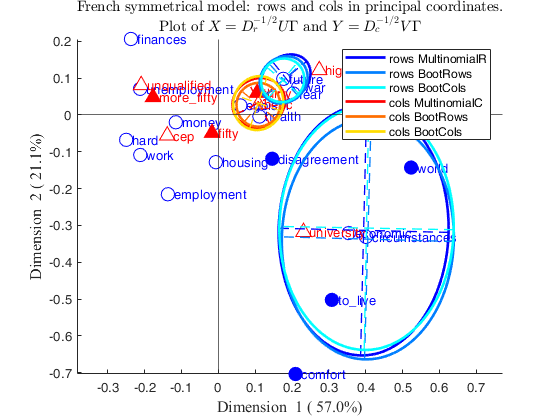
    Click here for the graphical output of this example (link to Ro.S.A. website)

  • Correspondence analysis plot with ellipses only on column points.
  • N=[51	64	32	29	17	59	66	70;
    53	90	78	75	22	115	117	86;
    71	111	50	40	11	79	88	177;
    1	7	5	5	4	9	8	5;
    7	11	4	3	2	2	17	18;
    7	13	12	11	11	18	19	17;
    21	37	14	26	9	14	34	61;
    12	35	19	6	7	21	30	28;
    10	7	7	3	1	8	12	8;
    4	7	7	6	2	7	6	13;
    8	22	7	10	5	10	27	17;
    25	45	38	38	13	48	59	52;
    18	27	20	19	9	13	29	53;
    35	61	29	14	12	30	63	58;
    2	4	3	1	4	nan  nan	nan	  ;
    2	8	2	5	2	nan  nan	nan;
    1	5	4	6	3	nan  nan	nan;
    3	3	1	3	4	nan  nan	nan];
    % rowslab = cell containing row labels
    rowslab={'money','future','unemployment','circumstances',...
    'hard','economic','egoism','employment','finances',...
    'war','housing','fear','health','work','comfort','disagreement',...
    'world','to_live'};
    % colslab = cell containing column labels
    colslab={'unqualified','cep','bepc','high_school_diploma','university',...
    'thirty','fifty','more_fifty'};
    if verLessThan('matlab','8.2.0')==0
    tableN=array2table(N,'VariableNames',colslab,'RowNames',rowslab);
    % Extract just active rows
    Nactive=tableN(1:14,1:5);
    Nsupr=tableN(15:18,1:5);
    Nsupc=tableN(1:14,6:8);
    Sup=struct;
    Sup.r=Nsupr;
    Sup.c=Nsupc;
    else
    Nactive=N(1:14,1:5);
    Lr=rowslab(1:14);
    Lc=colslab(1:5);
    Sup=struct;
    Sup.r=N(15:end,1:5);
    Sup.Lr=rowslab(15:end);
    Sup.c=N(1:14,6:8);
    Sup.Lc=colslab(6:8);
    end
    % Superimpose confidence ellipses
    confellipse=struct;
    % No confidence ellipse for row points
    confellipse.selRows=[];
    % Ellipse for all the column points using a Boolean vector
    confellipse.selCols=[ true true true true true];
    % Compare methods 'multinomial' and 'bootCols'
    confellipse.method={'multinomial' 'bootCols'};
    % Set number of simulations
    confellipse.nsimul=10000;
    % Set confidence interval
    confellipse.conflev=0.90;
    out=CorAna(Nactive,'Sup',Sup,'plots',0,'dispresults',false);
    % Draw correspondence analysis plot with requested confidence ellipses
    CorAnaplot(out,'plots',1,'confellipse',confellipse)

  • Correspondence analysis plot using latent dimensions 3 and 4.
  • N=[51	64	32	29	17	59	66	70;
    53	90	78	75	22	115	117	86;
    71	111	50	40	11	79	88	177;
    1	7	5	5	4	9	8	5;
    7	11	4	3	2	2	17	18;
    7	13	12	11	11	18	19	17;
    21	37	14	26	9	14	34	61;
    12	35	19	6	7	21	30	28;
    10	7	7	3	1	8	12	8;
    4	7	7	6	2	7	6	13;
    8	22	7	10	5	10	27	17;
    25	45	38	38	13	48	59	52;
    18	27	20	19	9	13	29	53;
    35	61	29	14	12	30	63	58;
    2	4	3	1	4	nan  nan	nan	  ;
    2	8	2	5	2	nan  nan	nan;
    1	5	4	6	3	nan  nan	nan;
    3	3	1	3	4	nan  nan	nan];
    % rowslab = cell containing row labels
    rowslab={'money','future','unemployment','circumstances',...
    'hard','economic','egoism','employment','finances',...
    'war','housing','fear','health','work','comfort','disagreement',...
    'world','to_live'};
    % colslab = cell containing column labels
    colslab={'unqualified','cep','bepc','high_school_diploma','university',...
    'thirty','fifty','more_fifty'};
    if verLessThan('matlab','8.2.0')==0
    tableN=array2table(N,'VariableNames',colslab,'RowNames',rowslab);
    % Extract just active rows
    Nactive=tableN(1:14,1:5);
    Nsupr=tableN(15:18,1:5);
    Nsupc=tableN(1:14,6:8);
    Sup=struct;
    Sup.r=Nsupr;
    Sup.c=Nsupc;
    else
    Nactive=N(1:14,1:5);
    Lr=rowslab(1:14);
    Lc=colslab(1:5);
    Sup=struct;
    Sup.r=N(15:end,1:5);
    Sup.Lr=rowslab(15:end);
    Sup.c=N(1:14,6:8);
    Sup.Lc=colslab(6:8);
    end
    % Superimpose ellipses
    confellipse=struct;
    % Ellipse for the first 3 row points
    confellipse.selRows=1:3;
    % Ellipse for selected column points using a Boolean vector
    confellipse.selCols=[ false false true true false];
    % Compare methods 'multinomial' and 'bootCols'
    confellipse.method={'multinomial' 'bootCols'};
    % Set number of simulations
    confellipse.nsimul=10000;
    % Set confidence interval
    confellipse.conflev=0.90;
    d1=3;
    d2=4;
    out=CorAna(Nactive,'Sup',Sup,'plots',0,'dispresults',false,'d1',d1,'d2',d2);
    % Draw correspondence analysis plot with requested confidence ellipses
    CorAnaplot(out,'plots',1,'confellipse',confellipse,'d1',d1,'d2',d2)

  • Correspondence analysis of the smoke data.
  • In this example we compare the results which are obtained using option plots.alpha='colprincipal'; (which implicitly implies alpha=0) with those which come out imposing directly plots.alpha=0.

    load smoke
    [N,~,~,labels]=crosstab(smoke{:,1},smoke{:,2});
    [I,J]=size(N);
    labels_rows=labels(1:I,1);
    labels_columns=labels(1:J,2);
    out=CorAna(N,'Lr',labels_rows,'Lc',labels_columns,'plots',0,'dispresults',false);
    plots=struct;
    plots.alpha='rowgab';
    plots.alpha='colgab';
    plots.alpha='rowgreen';
    plots.alpha='colgreen';
    % Add confidence ellipses
    confellipse=1;
    plots.alpha='bothprincipal';
    plots.alpha='rowprincipal';
    plots.alpha='colprincipal';
    h1=subplot(1,2,1);
    CorAnaplot(out,'plots',plots,'confellipse',confellipse,'h',h1)
    h2=subplot(1,2,2);
    plots.alpha=0;
    CorAnaplot(out,'plots',plots,'confellipse',confellipse,'h',h2);
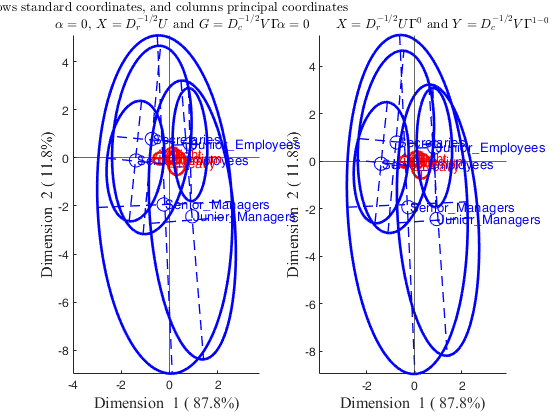
    Click here for the graphical output of this example (link to Ro.S.A. website)

  • Correspondence analysis of the car dataset.
  • load car
    out=CorAna(car,'plots',0);
    plots=struct;
    % Color of Row labels proportional to the amount of inertia which is
    % explained by the the two latent dimensions (communalities)
    plots.ColorMapLabelRows= 'CntrbDim2In';
    CorAnaplot(out,'plots',plots)

  • An example with personalized colormap in option plots.
  • load housetasks.mat
    out=CorAna(housetasks,'plots',0);
    % Show a colorbar which is proportional to the contribution of the first
    % two latent dimensions to the inertia of each
    % Use colorbar abyss in a reverse order, that is in such a way that
    % the darkest blue colors are associated with points with high communalities
    plots=struct;
    plots.ColorMapLabelRows= 'CntrbDim2In';
    plots.ColorMap=flipud(abyss);
    CorAnaplot(out,'plots',plots)
    % From the plot it is clear that the RowPoint "Official" has an inertia which
    % is not explained by the first two latent dimensions.
    disp(out.OverviewRows(:,["CntrbDim2In_1" "CntrbDim2In_2"]))
    Summary
                 Singular_value    Inertia    Accounted_for    Cumulative
                 ______________    _______    _____________    __________
    
        dim_1       0.73681        0.54289       0.48692        0.48692  
        dim_2       0.66709          0.445       0.39913        0.88605  
        dim_3       0.35644        0.12705       0.11395              1  
    
    ROW POINTS
    Results for dimension: 1
                      Scores     CntrbPnt2In    CntrbDim2In
                     ________    ___________    ___________
    
        Laundry      -0.99184       0.18287       0.73999  
        Main-meal    -0.87559       0.12389        0.7416  
        Dinner       -0.69257      0.054714       0.77664  
        Breakfast     -0.5086      0.038249       0.50494  
        Tidying      -0.39381      0.019984       0.43981  
        Dishes       -0.18896     0.0042617       0.11812  
        Shopping     -0.11768     0.0017552      0.063654  
        Official      0.22663     0.0052078      0.053045  
        Driving       0.74177      0.080778       0.43202  
        Finances      0.27077     0.0087501       0.16068  
        Insurance     0.64708      0.061471       0.57601  
        Repairs        1.5288        0.4073       0.70674  
        Holidays      0.25249      0.010773      0.029792  
    
    Results for dimension: 2
                      Scores     CntrbPnt2In    CntrbDim2In
                     ________    ___________    ___________
    
        Laundry      -0.49532      0.055639       0.18455  
        Main-meal    -0.49011      0.047355       0.23236  
        Dinner        -0.3081       0.01321        0.1537  
        Breakfast     -0.4528      0.036986       0.40023  
        Tidying       0.43434      0.029656       0.53502  
        Dishes        0.44197      0.028441       0.64615  
        Shopping      0.40332      0.025152       0.74766  
        Official     -0.25361     0.0079562      0.066426  
        Driving      -0.65341      0.076469       0.33523  
        Finances      0.61787      0.055585       0.83667  
        Insurance     0.47378      0.040204        0.3088  
        Repairs      -0.86426       0.15881       0.22587  
        Holidays        1.435       0.42454       0.96236  
    
    COLUMN POINTS
    Results for dimension: 1
                        Scores      CntrbPnt2In    CntrbDim2In
                       _________    ___________    ___________
    
        Wife            -0.83762       0.44462        0.80188 
        Alternating    -0.062185     0.0010374      0.0047799 
        Husband           1.1609       0.54234        0.77203 
        Jointly          0.14943      0.012004       0.020706 
    
    Results for dimension: 2
                        Scores     CntrbPnt2In    CntrbDim2In
                       ________    ___________    ___________
    
        Wife           -0.36522      0.10312        0.15245  
        Alternating    -0.29159     0.027828         0.1051  
        Husband        -0.60192      0.17787        0.20754  
        Jointly          1.0266      0.69118        0.97729  
    
    -----------------------------------------------------------
    Overview ROW POINTS
                       Mass      Score_1     Score_2     Inertia     CntrbPnt2In_1    CntrbPnt2In_2    CntrbDim2In_1    CntrbDim2In_2
                     ________    ________    ________    ________    _____________    _____________    _____________    _____________
    
        Laundry       0.10092    -0.99184    -0.49532     0.13416        0.18287         0.055639         0.73999          0.18455   
        Main-meal    0.087729    -0.87559    -0.49011    0.090692        0.12389         0.047355          0.7416          0.23236   
        Dinner       0.061927    -0.69257     -0.3081    0.038246       0.054714          0.01321         0.77664           0.1537   
        Breakfast    0.080275     -0.5086     -0.4528    0.041124       0.038249         0.036986         0.50494          0.40023   
        Tidying      0.069954    -0.39381     0.43434    0.024667       0.019984         0.029656         0.43981          0.53502   
        Dishes       0.064794    -0.18896     0.44197    0.019587      0.0042617         0.028441         0.11812          0.64615   
        Shopping     0.068807    -0.11768     0.40332     0.01497      0.0017552         0.025152        0.063654          0.74766   
        Official     0.055046     0.22663    -0.25361      0.0533      0.0052078        0.0079562        0.053045         0.066426   
        Driving      0.079702     0.74177    -0.65341     0.10151       0.080778         0.076469         0.43202          0.33523   
        Finances     0.064794     0.27077     0.61787    0.029564      0.0087501         0.055585         0.16068          0.83667   
        Insurance    0.079702     0.64708     0.47378    0.057936       0.061471         0.040204         0.57601           0.3088   
        Repairs       0.09461      1.5288    -0.86426     0.31287         0.4073          0.15881         0.70674          0.22587   
        Holidays     0.091743     0.25249       1.435     0.19631       0.010773          0.42454        0.029792          0.96236   
    
    Overview COLUMN POINTS
                        Mass       Score_1     Score_2     Inertia    CntrbPnt2In_1    CntrbPnt2In_2    CntrbDim2In_1    CntrbDim2In_2
                       _______    _________    ________    _______    _____________    _____________    _____________    _____________
    
        Wife           0.34404     -0.83762    -0.36522    0.30102        0.44462         0.10312           0.80188         0.15245   
        Alternating    0.14564    -0.062185    -0.29159    0.11782      0.0010374        0.027828         0.0047799          0.1051   
        Husband        0.21846       1.1609    -0.60192    0.38137        0.54234         0.17787           0.77203         0.20754   
        Jointly        0.29186      0.14943      1.0266    0.31472       0.012004         0.69118          0.020706         0.97729   
    
    -----------------------------------------------------------
    Legend
    CntrbPnt2In = relative contribution of points to explain total Inertia of the latent dimension
                  The sum of the numbers in a column is equal to 1
    CntrbDim2In = relative contribution of latent dimension to explain total Inertia of a point
                  CntrbDim2In_1+CntrbDim2In_2+...+CntrbDim2In_K=1
    --------------------------------
    The colormap of the row labels is proportional to the contribution
    of the two latent dimensions to the inertia of each point (communalities)
                     CntrbDim2In_1    CntrbDim2In_2
                     _____________    _____________
    
        Laundry         0.73999          0.18455   
        Main-meal        0.7416          0.23236   
        Dinner          0.77664           0.1537   
        Breakfast       0.50494          0.40023   
        Tidying         0.43981          0.53502   
        Dishes          0.11812          0.64615   
        Shopping       0.063654          0.74766   
        Official       0.053045         0.066426   
        Driving         0.43202          0.33523   
        Finances        0.16068          0.83667   
        Insurance       0.57601           0.3088   
        Repairs         0.70674          0.22587   
        Holidays       0.029792          0.96236   
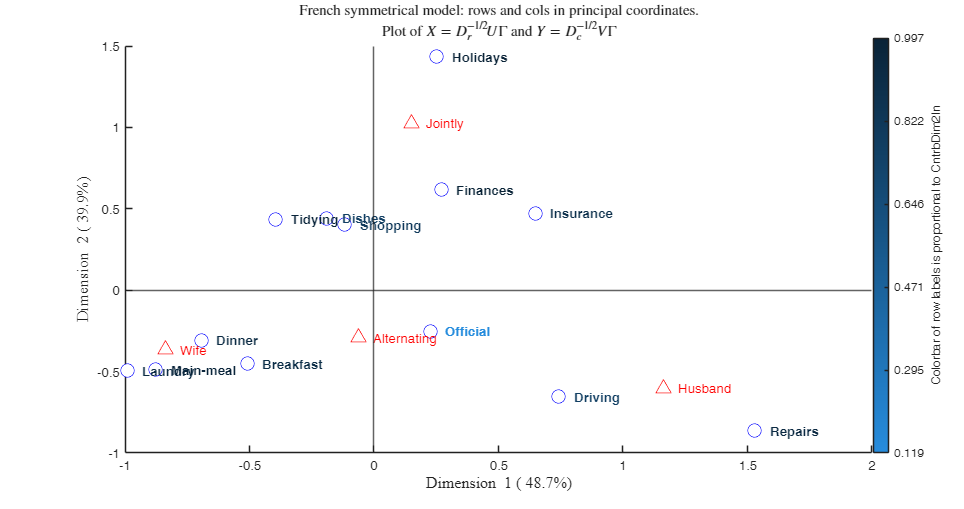
    
    
    Click here for the graphical output of this example (link to Ro.S.A. website)

    Input Arguments

    expand all

    out — Structure containing the output of function CorAna. Structure.

    Structure containing the following fields.

    Value Description
    Lr

    cell of length $I$ containing the labels of active rows (i.e. the rows which participated to the fit).

    Lc

    cell of length $J$ containing the labels of active columns (i.e. the columns which participated to the fit).

    n

    Grand total. out.n is equal to sum(sum(out.N)).

    This is the number of observations.

    Dr

    Square matrix of size $I$ containing on the diagonal the row masses. This is matrix $D_r$.

    \[ D_r=diag(r) \]

    Dc

    Square matrix of size $J$ containing on the diagonal the column masses. This is matrix $D_c$.

    \[ D_c=diag(c) \]

    InertiaExplained

    matrix with 4 columnn.

    - First column contains the singular values (the sum of the squared singular values is the total inertia).

    - Second column contains the eigenvalues (the sum of the eigenvalues is the total inertia).

    - Third column contains the variance explained by each latent dimension.

    - Fourth column contains the cumulative variance explained by each dimension.

    LrSup

    cell containing the labels of the supplementary rows (i.e. the rows whicg did not participate to the fit).

    LcSup

    cell containing the labels of supplementary columns (i.e. the columns which did not participate to the fit).

    SupRowsN

    matrix of size length(LrSup)-by-c referred to supplementary rows. If there are no supplementary rows this field is not present.

    SupColsN

    matrix of size r-by-length(LcSup) referred to supplementary columns.

    If there are no supplementary columns this field is not present.

    RowsPriSup

    Principal coordinates of supplementary rows.

    If there are no supplementary rows this field is not present.

    RowsStaSup

    Standard coordinates of supplementary rows.

    If there are no supplementary rows this field is not present.

    RowsSymSup

    Symmetrical coordinates of supplementary rows.

    If there are no supplementary rows this field is not present.

    ColsPriSup

    Principal coordinates of supplementary columns.

    If there are no supplementary columns this field is not present.

    ColsStaSup

    Standard coordinates of of supplementary columns.

    If there are no supplementary columns this field is not present.

    ColsSymSup

    Symmetrical coordinates of supplementary columns.

    If there are no supplementary columns this field is not present.

    OverviewRows

    $I$-times-(k*3+2) table containing an overview of row points. More precisely, if we suppose that $k=2$, First column contains the row masses (vector $r$).

    Second column contains the scores of first dimension.

    Third column contains the scores of second dimension.

    Fourth column contains the inertia of each point, where inertia of point is the squared distance of point $d_i^2$ to the centroid.

    Fifth column contains the relative contribution of each point to the explanation of the inertia of the first dimension. The sum of the elements of this column is equal to 1.

    Sixth column contains the relative contribution of each point to the explanation of the inertia of the second dimension. The sum of the elements of this column is equal to 1.

    Seventh column contains the relative contribution of the first dimension to the explanation of the inertia of the point.

    Eight column contains the relative contribution of the second dimension to the explanation of the inertia of the point.

    OverviewCols

    $J$-times-(k*3+2) table containing an overview of row points. More precisely if we suppose that $k=2$ First column contains the column masses (vector $c$).

    Second column contains the scores of first dimension.

    Third column contains the scores of second dimension.

    Fourth column contains the inertia of each point, where inertia of point is the squared distance of point $d_i^2$ to the centroid.

    Fifth column contains the relative contribution of each point to the explanation of the inertia of the first dimension. The sum of the elements of this column is equal to 1.

    Sixth column contains the relative contribution of each point to the explanation of the inertia of the second dimension. The sum of the elements of this column is equal to 1.

    Seventh column contains the relative contribution of the first dimension to the explanation of the inertia of the point.

    Eight column contains the relative contribution of the second dimension to the explanation of the inertia of the point.

    Data Types: struct

    Name-Value Pair Arguments

    Specify optional comma-separated pairs of Name,Value arguments. Name is the argument name and Value is the corresponding value. Name must appear inside single quotes (' '). You can specify several name and value pair arguments in any order as Name1,Value1,...,NameN,ValueN.

    Example: 'plots',plots=struct; plots.colorcols='k' , 'addx',0.01 , 'addy',0.01 , 'changedimsign', [true false] , 'confellipse', 0 , 'xlimx',[-1 1] , 'ylimy',[0 1] , 'd1',2 , 'd2',3 ,'h',h1 where h1=subplot(2,1,1)

    plots —Customize plot appearance.scalar | structure.

    If plots is not a structure, a plot which shows the Principal coordinates of rows and columns is shown on the screen. If plots is a structure it may contain the following fields:

    Value Description
    alpha

    type of plot, scalar in the interval [0 1] or a string identifying the type of coordinates to use in the plot.

    If $plots.alpha='rowprincipal'$ the row points are in principal coordinates and the column coordinates are standard coordinates. Distances between row points are (approximated) chi-squared distances (row-metric-preserving). The position of the row points are at the weighted average of the column points.

    Note that 'rowprincipal' can also be specified setting plots.alpha=1.

    If $plots.alpha='colprincipal'$, the column coordinates are referred to as principal coordinates and the row coordinates as standard coordinates.

    Distances between column points are (approximated) chi-squared distances (column-metric-preserving). The position of the column points are at the weighted average of the row points.

    Note that 'colprincipal' can also be specified setting plots.alpha=0.

    If $plots.alpha='symbiplot'$, the row and column coordinates are scaled similarly. The sum of weighted squared coordinates for each dimension is equal to the corresponding singular values. These coordinates are often called symmetrical coordinates. This representation is particularly useful if one is primarily interested in the relationships between categories of row and column variables rather than in the distances among rows or among columns. 'symbiplot' can also be specified setting plots.alpha=0.5;

    If $plots.alpha='bothprincipal'$, both the rows and columns are depicted in principal coordinates. Such a plot is often referred to as a symmetrical plot or French symmetrical model. Note that such a symmetrical plot does not provide a feasible solution in the sense that it does not approximate matrix $D_r^{-0.5}(P-rc')D_c^{-0.5}$.

    If $plots.alpha='bothstandard'$, both the rows and columns are depicted in standard coordinates. The standard coordinates are the principal coordinates divided by the corresponding singular values.

    If $plots.alpha='rowgab'$, rows are in principal coordinates and columns are in standard coordinates multiplied by the mass. This biplot has been suggested by Gabriel and Odoroff (1990).

    If $plots.alpha='colgab'$, columns are in principal coordinates and rows are in standard coordinates multiplied by the mass. This biplot has been suggested by Gabriel and Odoroff (1990).

    If $plots.alpha='rowgreen'$, rows are in principal coordinates and columns are in standard coordinates multiplied by square root of the mass.

    This biplot has been suggested by Greenacre and incorporates the contribution of points. In this display, points that contribute very little to the solution, are close to the center of the biplot and are relatively unimportant to the interpretation. This biplot is often referred as contribution biplot because it visually shows the most contributing points (Greenacre 2006b).

    If $plots.alpha='colgreen'$, columns in principal coordinates and rows in standard coordinates multiplied by the square root of the mass.

    This biplot has been suggested by Greenacre and incorporates the contribution of points. In this display, points that contribute very little to the solution, are close to the center of the biplot and are relatively unimportant to the interpretation. This biplot is often referred as contribution biplot because it shows visually the most contributing points (Greenacre 2006b).

    If $plots.alpha=scalar$ in the interval [0 1], row coordinates are given by $D_r^{-1/2} U \Gamma^\alpha$ and column coordinates are given by $D_c^{-1/2} V \Gamma^{1-\alpha}$. Note that for any choice of $\alpha$ the matrix product $ D_r^{-1/2} U \Gamma^\alpha (D_c^{-1/2} V \Gamma^{1-\alpha})^T$ optimally approximates matrix $D_r^{-0.5}(P-rc')D_c^{-0.5}$, in the sense that the sum of squared differences between $D_r^{1/2} D_r^{-1/2} U \Gamma^\alpha (D_c^{-1/2} V \Gamma^{1-\alpha})^T D_c^{1/2}$ and $D_r^{-0.5}(P-rc')D_c^{-0.5}$ is as small as possible.

    FontSize

    scalar which specifies the font size of row (column) labels. The default value is 10.

    FontSizeSup

    scalar which specifies the font size of row (column) labels of supplementary points. The default value is 10.

    MarkerSize

    scalar which specifies the marker size of symbols associated with rows or columns. The default value is 10.

    SymbolRows

    character which specifies the symbol to use for row points. If this field is not present the default symbols is 'o'.

    SymbolCols

    character which specifies the symbol to use for column points. If this field is not present the default symbols is '^'.

    SymbolRowsSup

    character which specifies the symbol to use for supplementary row points. If this field is not present the default symbols is 'o'.

    SymbolColsSup

    character which specifies the symbol to use for supplementary column points. If this field is not present the default symbols is '^'.

    ColorRows

    character which specifies the symbol to use for row points or RGB triplet. If this field is not present the default color is 'b'.

    ColorMapLabelRows

    character or cell which specifies whether the color of row labels must depend on a colormap. ColorMapLabelRows can be any of the VariableNames of out.OverviewRows. For example if ColorMapLabelRows=out.OverviewRows.Properties.VariableNames{1} it is possible to obtain a colormap where row labels colors are proportional to the masses. If plots.ColorMapLabelRows='CntrbPnt2In' it is possible to have a colormap where row labels are proportional to the contribution of the row points to the inertia of the two latent dimensions. If plots.ColorMapLabelRows='CntrbDim2In' it is possible to have a colormap of the row labels proportional to the contribution of the two latent dimensions to the inertia of each point (communalities). The default is plots.ColorMapLabelRows='' that is row labels have the same colors.

    ColorCols

    character which specifies the symbol to use for column points or RGB triplet. If this field is not present the default color is 'r'.

    ColorMapLabelCols

    character or cell which specifies whether the color of column labels must depend on a colormap. ColorMapLabelCols can be any of the VariableNames of out.OverviewCols. For example if ColorMapLabelCols=out.OverviewCols.Properties.VariableNames{1} it is possible to obtain a colormap where row labels colors are proportional to the masses. If plots.ColorMapLabelCols='CntrbPnt2In' it is possible to have a colormap where column labels are proportional to the contribution of the column points to the inertia of the two latent dimensions. If plots.ColorMapLabelCols='CntrbDim2In' it is possible to have a colormap of the column labels proportional to the contribution of the two latent dimensions to the inertia of each point (communalities). The default is plots.ColorMapLabelCols='' that is column labels have the same colors.

    ColorMap

    type of colormap to use in plots.ColorMapLabelRows plots.ColorMapLabelCols.

    Colormap is specified as a colormap name, a three-column matrix of RGB triplets, or 'default'. A colormap name specifies a predefined colormap with the same number of colors as the current colormap. A three-column matrix of RGB triplets specifies a custom colormap. You can create the matrix yourself, or you can call one of the predefined colormap functions to create the matrix. The default is to use the colormap "cool".

    ColorRowsSup

    character which specifies the symbol to use for row points or RGB triplet. If this field is not present the default color is 'b'.

    ColorColsSup

    character which specifies the symbol to use for supplementary column points or RGB triplet. If this field is not present the default color is 'r'.

    MarkerFaceColorRows

    character which specifies the marker fill color to use for active row points or RGB triplet. If this field is not present the default color is 'auto'.

    MarkerFaceColorCols

    character which specifies the marker fill color to use for active column points or RGB triplet. If this field is not present the default color is 'auto'.

    MarkerFaceColorRowsSup

    character which specifies the marker fill color to use for supplementary row points or RGB triplet. If this field is not present the default color is 'auto'.

    MarkerFaceColorColsSup

    character which specifies the marker fill color to use for supplementary column points or RGB triplet. If this field is not present the default color is 'auto'.

    Example: 'plots',plots=struct; plots.colorcols='k'

    Data Types: double

    addx —horizontal displacement for labels.scalar | empty.

    Amount of horizontal displacement which has been put on the labels in the plot. The default value of addx (addx is empty) is (max(x)-min(x))/50.

    Example: 'addx',0.01

    Data Types: double

    addy —vertical displacement for labels.scalar.

    Amount of vertical displacement which has been put on the labels in the plot. The default value of addy is 0.

    Example: 'addy',0.01

    Data Types: double

    changedimsign —change chosen dimension sign.boolean vector of length 2.

    Sometimes for better interpretability it is necessary to change the sign of the coordinates for the chosen dimension. If changedimsign(1) is true the sign of the coordinates for first chosen dimension is changed. If changedimsign(2) is true the sign of the coordinates for first chosen dimension is changed. As default the dimensions are the first and the second however, they can be changed using option plots.dim. The default value of changedimsign is [false false] that is the sign is not changed.

    Example: 'changedimsign', [true false]

    Data Types: boolean

    confellipse —confidence ellipses around rows and/or columns points.scalar | struct.

    If confellipse is 1, 90 per cent confidence ellipses are drawn around each row and column point based on multinomial method.

    If confellipse is a struct it may contain the following fields.

    Value Description
    conflev

    number in the interval (0 1) which defines the confidence level of each ellipse. If this field is not present 90 per cent confidence ellipses are shown

    method

    cell which specifies the method(s) to use to compute confidence ellipses. Possible values are: {'multinomial'} = in this case the original contingency table with the active elements is taken as a reference.

    Then new data tables are drawn in the following way: $r\times c$ values are drawn from a multinomial distribution with theoretical frequencies equals to $n_{ij}/n$ where $n$ is the sample size.

    {'bootRows'} = the values are bootstrapped row by row: Given row i, $n_{i.}$ are extracted with repetition and a frequency distribution is computed using classes $[0, n_{i1}]$,$[n_{i1}, n_{i1}+n_{i2}]$, $\ldots$ $[\sum_{j=1}^{J-1} n_{ij}, \sum_{j=1}^{J} n_{ij}$.

    {'bootCols'} = the values are bootstrapped column by column. If confellipse.method for example is {'bootRows' 'bootCols'} two ellipses are drawn for each point. In this case it is possible to appreciate the stability of both methods. If this field is not present {'multinomial'} method is used.

    nsimul

    scalar which defines the number of contingency tables which have to ge generated. The default value of confellipse.nsimul is 1000. Thus nsimul new contingency tables are projected as supplementary rows and/or supplementary columns.

    selRows

    vector which specifies for which row points it is necessary to draw the ellipses.

    confellipse.selRows either a boolean vector of length I containing a true in correspondence of the row elements for which the ellipse has to be drawn or a numeric vector which contains the indexes of the units which have to be drawn or a cell array containing the names of the rows for which the ellipse has to be drawn.

    For example if I=3 and the second row is called 'row2' in order to show just the confidence ellipse for this row it is possible to use confellipse.selRows=[false true false], or confellipse.selRows=2 or confellipse.selRows={'row2'}.

    selCols

    vector which specifies for which column points it is necessary to draw the ellipses.

    confellipse.selCols can be either a boolean vector of length J containing a true in correspondence of the column elements for which the ellipse has to be drawn or a numeric vector which contains the indexes of the columns which have to be drawn or a cell array containing the names of the columns for which the ellipse has to be drawn. For example if J=3 and one the third column is called 'Col3' in order to show just the confidence ellipse for this element it is possible to use confellipse.selCols=[false false true], or confellipse.selCols=3 or confellipse.selCols={'Col3'}.

    AxesEllipse

    boolean which specifies whether it is necessary to show the major axes of the ellipse.

    The default value of confellipse.AxesEllipse is true that is the axes are shown.

    Example: 'confellipse', 0

    Data Types: scalar or struct

    xlimx —Min and Max of the x axis.vector.

    Vector with two elements controlling minimum and maximum of the x axis.

    Example: 'xlimx',[-1 1]

    Data Types: double

    ylimy —Min and Max of the y axis.vector.

    Vector with two elements controlling minimum and maximum of the y axis.

    Example: 'ylimy',[0 1]

    Data Types: double

    d1 —Dimension to show on the horizontal axis.positive integer.

    Positive integer in the range 1, 2, .., K which indicates the dimension to show on the x axis. The default value of d1 is 1.

    Example: 'd1',2

    Data Types: single | double

    d2 —Dimension to show on the vertical axis.positive integer.

    Positive integer in the range 1, 2, .., K which indicates the dimension to show on the y axis. The default value of d2 is 2.

    Example: 'd2',3

    Data Types: single | double

    h —the axis handle of a figure where to send the CorAnaplot.this can be used to host the CorAnaplot in a subplot of a complex figure formed by different panels (for example a panel with CorAnaplot from plots.

    alpha=0.2 and another with CorAnaplot from plots.alpha=0.5).

    Example: 'h',h1 where h1=subplot(2,1,1)

    Data Types: Axes object (supplied as a scalar)

    Output Arguments

    References

    Benzecri, J.-P. (1992), "Correspondence Analysis Handbook", New-York, Dekker.

    Benzecri, J.-P. (1980), "L'analyse des donnees tome 2: l'analyse des correspondances", Paris, Bordas.

    Greenacre, M.J. (1993), "Correspondence Analysis in Practice", London, Academic Press.

    Gabriel, K.R. and Odoroff, C. (1990), Biplots in biomedical research, "Statistics in Medicine", Vol. 9, pp. 469-485.

    Greenacre, M.J. (1993), Biplots in correspondence Analysis, "Journal of Applied Statistics", Vol. 20, pp. 251-269.

    Riani, M, Atkinson A.C., Torti, F., Corbellini A. (2023), Robust Correspondence Analysis, "Journal of the Royal Statistical Society Series C: Applied Statistics", Vol. 71, pp. 1381–1401, https://doi.org/10.1111/rssc.12580

    Urbano, L.-S., van de Velden, M. and Kiers, H.A.L. (2009), CAR: A MATLAB Package to Compute Correspondence Analysis with Rotations, "Journal of Statistical Software", Vol. 31.

    See Also

    |

    This page has been automatically generated by our routine publishFS