getTickers

getTickers retrieves representative or full ticker lists for a market/index

Syntax

Description

getTickers, getYahoo and getFundamentals can be used jointly to build a complete workflow: from the selection of representative market tickers, to the retrieval and dynamic interactive plot of their price time series, and finally to the extraction of their fundamental financial information.

For background on financial data and market analysis, see: Yahoo Finance API documentation https://finance.yahoo.com/

example

T =getTickers() Default market and default number of stocks.

example

T =getTickers(Name, Value) Top 10 constituents for Milan.

Examples

expand all

  • Default market and default number of stocks.
  • Get a table with two columns. Tickers and name from Nasdaq.

    % Use static representative list.
    T = getTickers;
    disp(T)

  • Top 10 constituents for Milan.
  • Use static representative list.

    T = getTickers('market','Milan');
    disp('Tickers from Milan stock exchange market')
    disp(T)

    Related Examples

    expand all

  • Top 10 constituents for S&P 500 without the index row.
  • Use static representative list.

    T = getTickers('market','SP500','IncludeIndex',false);

  • Top 15 Nasdaq tickers ranked by market cap using static list.
  • T = getTickers('market','Nasdaq','nStocks',15,'Source','static');

  • Dynamic list then keep only top 20 by market cap.
  • T = getTickers('market','London','nStocks',20,'Source','dynamic','RankByCap',true);

  • Dynamic CAC 40 constituents.
  • T = getTickers('market','CAC40','Source','dynamic','nStocks',Inf);

  • Top 20 Nikkei names ranked by market cap.
  • T = getTickers('market','Nikkei225','nStocks',20,'RankByCap',true);

  • Example of combined use of getTickers and getFundamentals.
  • Example of combined use of getTickers and getFundamentals.
    T = getTickers('market','SP500','nStocks',10,'RankByCap',true);
    disp(T)
    % Retrieve fundamentals and verify ranking
    F = getFundamentals(T.ticker(2:end),'Fields','basic');
    disp(F(:,{'TickerSymbol','marketCap'}))

  • Example of combined use of getTickers, getYahoo and getFundamentals.
  • Step 1: get tickers

    T = getTickers('market','CAC40','nStocks',5,'RankByCap',true);
    % Step 2: get prices
    P = getYahoo(T.ticker(2:end));
    % Step 3: fundamentals
    F = getFundamentals(T.ticker(2:end),'Fields','performance');
    % Combine outputs manually
    disp(T)
    disp(F)

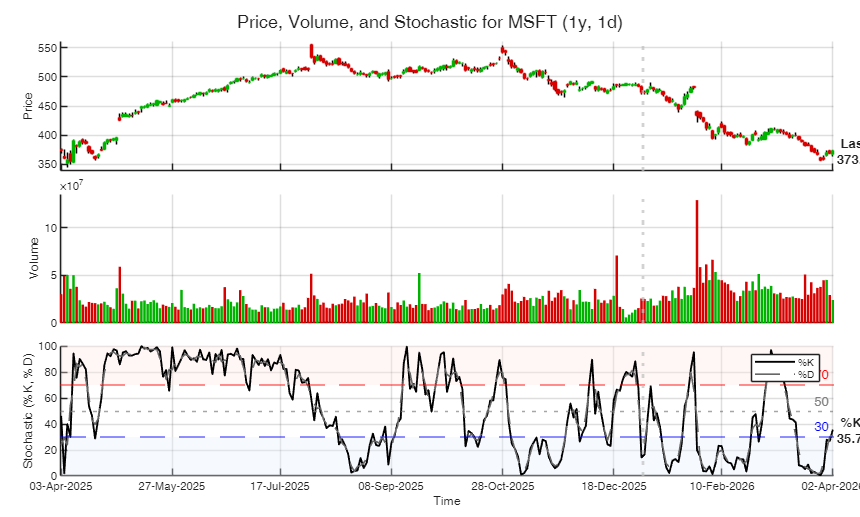
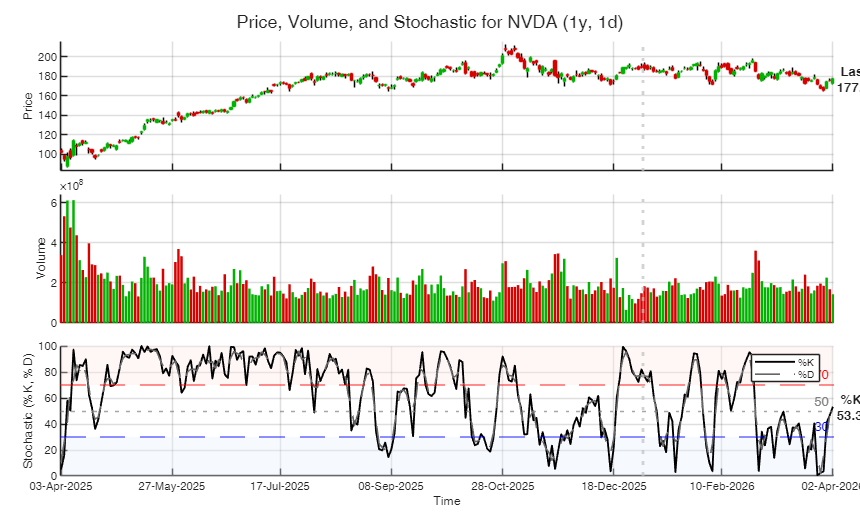
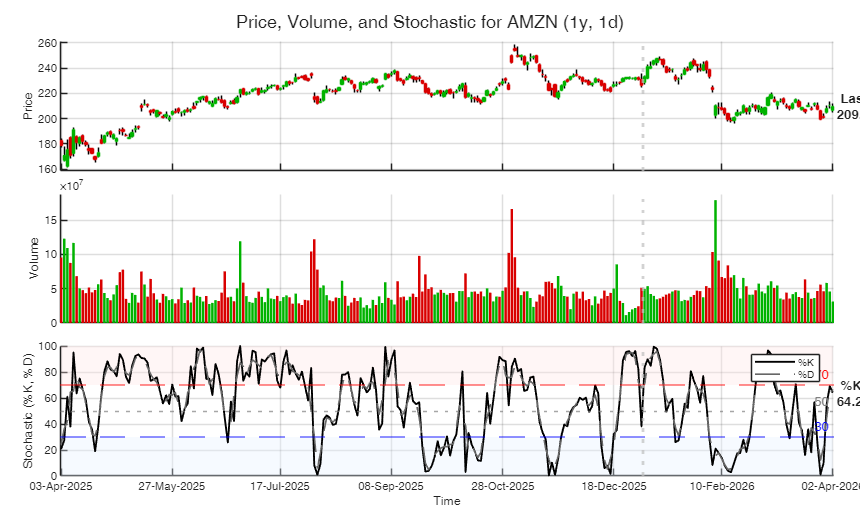
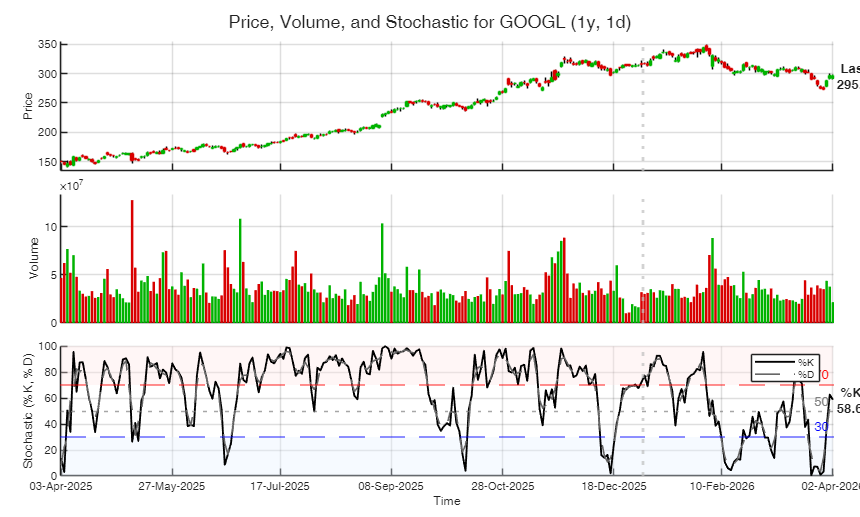
  • Example with full pipeline.
  • STEP 1: Retrieve top tickers (static, no ranking).

    T = getTickers('market','Nasdaq','nStocks',5);
    disp(T)
    % STEP 2: Download price data for those tickers.
    out = getYahoo(T.ticker(2:end));  % skip index
    disp(out)
    % STEP 3: Retrieve fundamentals.
    F = getFundamentals(T.ticker(2:end),'Fields','basic');
    disp(F)
        ticker            Name       
        _______    __________________
    
        "^IXIC"    "Nasdaq Composite"
        "AAPL"     "Apple"           
        "MSFT"     "Microsoft"       
        "NVDA"     "NVIDIA"          
        "AMZN"     "Amazon"          
        "GOOGL"    "Alphabet Class A"
    
    Requested pair range=1y, interval=1m is not supported.
    Using interval=1d instead.
    
    Processing ticker 1 of 5: AAPL
    
    Processing ticker 2 of 5: MSFT
    
    Processing ticker 3 of 5: NVDA
    
    Processing ticker 4 of 5: AMZN
    
    Processing ticker 5 of 5: GOOGL
      5×1 struct array with fields:
    
        Ticker
        LastPeriod
        intervalRequested
        intervalActual
        TimeZone
        TT
        Indicators
        Success
        Message
        class
    
                                       CompanyName           TickerSymbol    marketCap               sector                           industry             
                                _________________________    ____________    __________    __________________________    __________________________________
    
        AppleInc_               {'Apple Inc.'           }     {'AAPL' }      3.7615e+12    {'Technology'            }    {'Consumer Electronics'          }
        MicrosoftCorporation    {'Microsoft Corporation'}     {'MSFT' }      2.7757e+12    {'Technology'            }    {'Software - Infrastructure'     }
        NVIDIACorporation       {'NVIDIA Corporation'   }     {'NVDA' }      4.3115e+12    {'Technology'            }    {'Semiconductors'                }
        Amazon_com_Inc_         {'Amazon.com, Inc.'     }     {'AMZN' }      2.2519e+12    {'Consumer Cyclical'     }    {'Internet Retail'               }
        AlphabetInc_            {'Alphabet Inc.'        }     {'GOOGL'}      3.5779e+12    {'Communication Services'}    {'Internet Content & Information'}
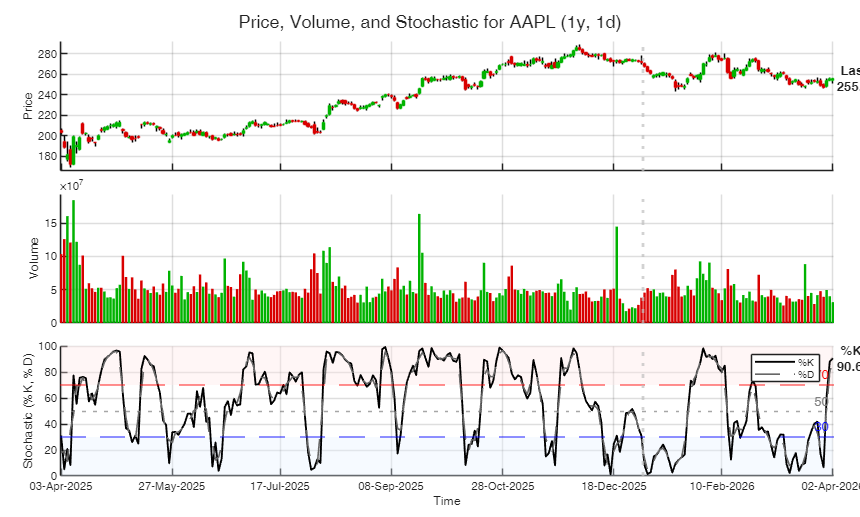
    
    
    Click here for the graphical output of this example (link to Ro.S.A. website)

    Input Arguments

    expand all

    Name-Value Pair Arguments

    Specify optional comma-separated pairs of Name,Value arguments. Name is the argument name and Value is the corresponding value. Name must appear inside single quotes (' '). You can specify several name and value pair arguments in any order as Name1,Value1,...,NameN,ValueN.

    Example: 'market', 'DAX' , 'nStocks',15 , 'Source','dynamic' , 'RankByCap',false , 'IncludeIndex',false , 'msg',false

    market —Market or index name.character | string scalar.

    Possible values are: 'Nasdaq' or 'Nasdaq100' 'SP500' or 'S&P500' 'NYSE' 'Milan' or 'FTSEMIB' 'London' or 'FTSE100' 'DAX' or 'DAX40' 'CAC40' or 'CAC' 'Nikkei225' or 'Nikkei' Default is 'Nasdaq'.

    Example: 'market', 'DAX'

    Data Types: char | string

    nStocks —Number of representative stocks to return, excluding the market index.positive integer scalar.

    Default is 10.

    Maximum allowed value is 30 when Source is 'static'. When Source is 'dynamic' Inf means all components.

    Example: 'nStocks',15

    Data Types: double

    Source —Source used to build the market universe.char | string.

    Possible values are: 'static' : use internal curated lists made up to 30 stocks.

    'dynamic' : use dynamic download by scraping an online table of index constituents, when available.

    Default is 'static'.

    Example: 'Source','dynamic'

    Data Types: char | string

    RankByCap —Use ranking criterion based on marketCap.scalar boolean.

    Retrieve market capitalization for each stock and rank the constituents accordingly. Note that Ranking is applied only to the constituents, not to the index row.

    The default value of RankByCap is false.

    Example: 'RankByCap',false

    Data Types: logical

    IncludeIndex —Include the market index in the first row.logical scalar.

    Default is true.

    If true, the first row of the output table contains the market index and its descriptive name.

    Example: 'IncludeIndex',false

    Data Types: logical

    msg —Display progress messages.logical scalar.

    Default is true.

    Example: 'msg',false

    Data Types: logical

    Output Arguments

    expand all

    T —Output table. Table with variables: First column = ticker symbol (ticker); Second column = company name (Name); Third column = market capitalization (MarketCap) This variable is present only if RankByCap=true

    The first row contains the market index if IncludeIndex=true.

    References

    Damodaran, A. (2012), "Investment Valuation: Tools and Techniques for Determining the Value of Any Asset", 3rd Edition, Wiley.

    Cochrane, J. H. (2023), "Asset Pricing, Revised Edition", Princeton University Press, Princeton.

    Koller, T., Goedhart, M., and Wessels, D. (2020), "Valuation: Measuring and Managing the Value of Companies, 7th Edition", Wiley, Hoboken.

    This page has been automatically generated by our routine publishFS